String traversal
String traversal means visiting each character in a string with a loop, index, or slice.
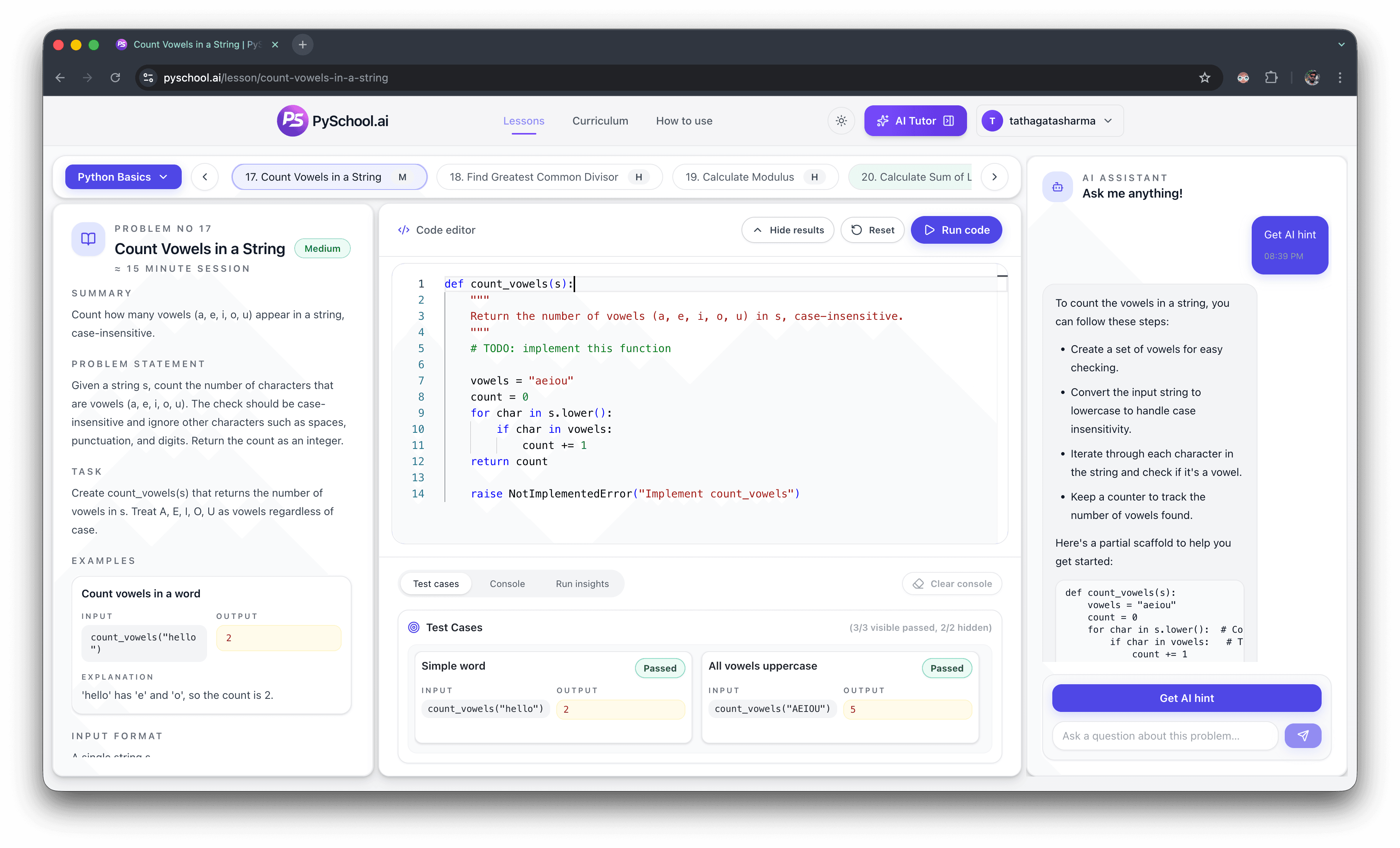
Python string practice problems
Use this page for Python string exercises that are narrower than the broad strings hub. The sequence starts with storing and combining text, then moves into formatting, reversal, palindrome checks, vowel counts, blanks, and run-length encoding.
Focused intent
Python string practice problems
Practice count
8 ordered exercises
Examples
Each prompt includes sample input and expected output
Next click
Open matching lessons or public teaser pages
Editorial trust
Long-tail practice clusters are curated from the public curriculum, lesson teaser pages, and topic hubs so learners can compare a focused sequence before opening an interactive exercise.
See the PySchool.ai editorial policy for how practice content is generated, reviewed, tested, and updated.
Direct answer
Python string practice problems should train exact output, character traversal, case handling, slicing, reversal, palindrome checks, and counting. Beginners should start with storing and formatting strings, then solve vowel-count and blank-filtering prompts. Always test empty strings, one-character strings, spaces, and different casing.
String traversal means visiting each character in a string with a loop, index, or slice.
Exact output means the answer must match spaces, punctuation, capitalization, and order.
A character count records how often selected letters or symbols appear in a string.
Best exercises
Common mistakes
Check whether the prompt wants exact text or normalized text before comparing strings.
Test one-character and two-character strings when using indexes.
Try the loop version first, then use slicing once the character order is clear.
Learner questions
Start with storing strings, formatting, reversing, palindrome checks, counting vowels, and skipping blank strings.
Group questions by pattern: exact output, indexing, slicing, reversal, palindrome checks, counting, then compression.
No. Slicing is useful, but loop-based traversal helps with counting, filtering, and frequency problems.
String tests compare exact values, so extra spaces, missing spaces, and wrong case are real bugs.
Yes. Palindromes, anagrams, reversal, compression, and frequency counts are common interview foundations.
Ordered practice
This page is narrower than the broader python strings practice. It is built for learners who already know the topic they want to practice and need a concrete sequence with examples, expected output, and common mistakes before opening the editor.
1. Warmup - Text values
Assign a string value and return it exactly.
Example
"Python"
Expected output
"Python"
Why it matters: String practice starts with valid quotes and exact values.
2. Warmup - Combining text
Join two strings with the expected spacing.
Example
"Py", "School"
Expected output
"PySchool"
Why it matters: Concatenation makes spacing and order visible.
3. Warmup - Formatting
Insert values into a readable sentence.
Example
name = "Ada"
Expected output
"Hello, Ada!"
Why it matters: Formatting is safer than hard-coding every answer.
4. Core - Traversal
Return the characters from last to first.
Example
"python"
Expected output
"nohtyp"
Why it matters: Reversal teaches order, indexes, and slicing.
5. Core - Comparison
Return whether a string reads the same forward and backward.
Example
"level"
Expected output
True
Why it matters: Palindrome checks combine reversal and exact comparison.
6. Core - Character counting
Return how many vowels appear in the text.
Example
"Education"
Expected output
5
Why it matters: Counting selected characters prepares learners for frequency maps.
7. Core - Filtering text
Remove blank strings from a list of text values.
Example
["a", "", "b"]
Expected output
["a", "b"]
Why it matters: Real text inputs often contain blanks that must be filtered.
8. Stretch - Compression
Group repeated adjacent characters into counts.
Example
"aaabb"
Expected output
"a3b2"
Why it matters: Compression is a stretch string problem that combines traversal and state.
Practice order
Continue practicing
Practice exact text output, traversal, formatting, and character-level logic.
Practice loop patterns before moving into mixed collection problems.
Practice indexing, scanning, filtering, transforming, and list edge cases.
Use the main Python practice hub for beginner, topic, DSA, and interview paths.
Exercise links open the browser editor or the public teaser for the matching curriculum lesson.
Continue through the full curriculum when you want the locked sequence, progress, and tutor support.